Communication Stages
Five communication stages from single words to fluent AAC. Grid density, vocabulary complexity, and predictions adapt to match the communicator's level. Start where they are today and grow from there.
The Five Stages
Communication development does not happen all at once. Pie Talker organizes vocabulary and features into five stages that mirror how communication skills actually grow. Each stage increases the amount of vocabulary visible, the density of the grid, and the sophistication of word predictions.
There is no right or wrong stage. A person recovering from a stroke may start at Stage 2. A young child just beginning AAC may start at Stage 1. An experienced AAC user may be fully comfortable at Stage 5. The stage can be changed at any time.
Stage 1: Requesting
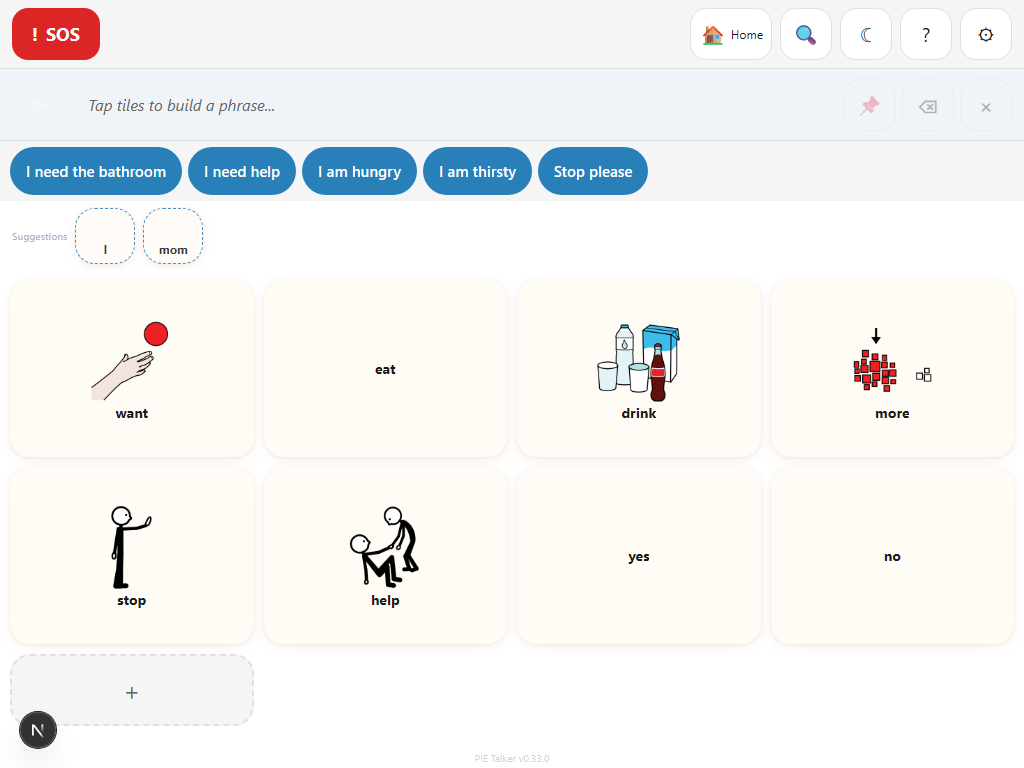
The starting point for new communicators. The grid is small—typically 2 to 3 columns—with large, easy-to-target tiles. Vocabulary focuses on basic wants and needs: "I want," "more," "stop," "help," "yes," "no," along with a few highly motivating items like favorite foods or activities. The goal at this stage is simple cause-and-effect: tap a tile, something happens. Predictions are minimal or off entirely, reducing visual clutter so the communicator can focus on the core concept of making choices.
Stage 2: Combining
The communicator has grasped the basics and is ready to put two words together. Grid density increases slightly to accommodate more vocabulary. Phrases like "I want juice," "more please," and "go outside" become possible. Simple verbs and a handful of descriptors appear. Predictions begin offering completions for two-word combinations. The phrase strip becomes more useful as the communicator learns to build short sentences before speaking them.
Stage 3: Describing
Adjectives, prepositions, and question words join the vocabulary. The communicator can describe things ("big red ball"), ask questions ("where is Mom?"), and express location ("on the table"). Grid density grows to a standard layout with more tiles per row. Predictions become context-aware, suggesting words that logically follow what has already been said. Folder navigation becomes more important as the vocabulary tree expands.
Stage 4: Storytelling
Past tense, future tense, and emotional vocabulary open up. The communicator can recount events ("I went to the park yesterday"), express complex feelings ("I feel frustrated because..."), and participate in longer conversations. Grammar support tiles for tense markers and conjunctions appear. Predictions draw on a wider context window, anticipating multi-sentence exchanges. The full depth of vocabulary folders is accessible.
Stage 5: Fluent AAC
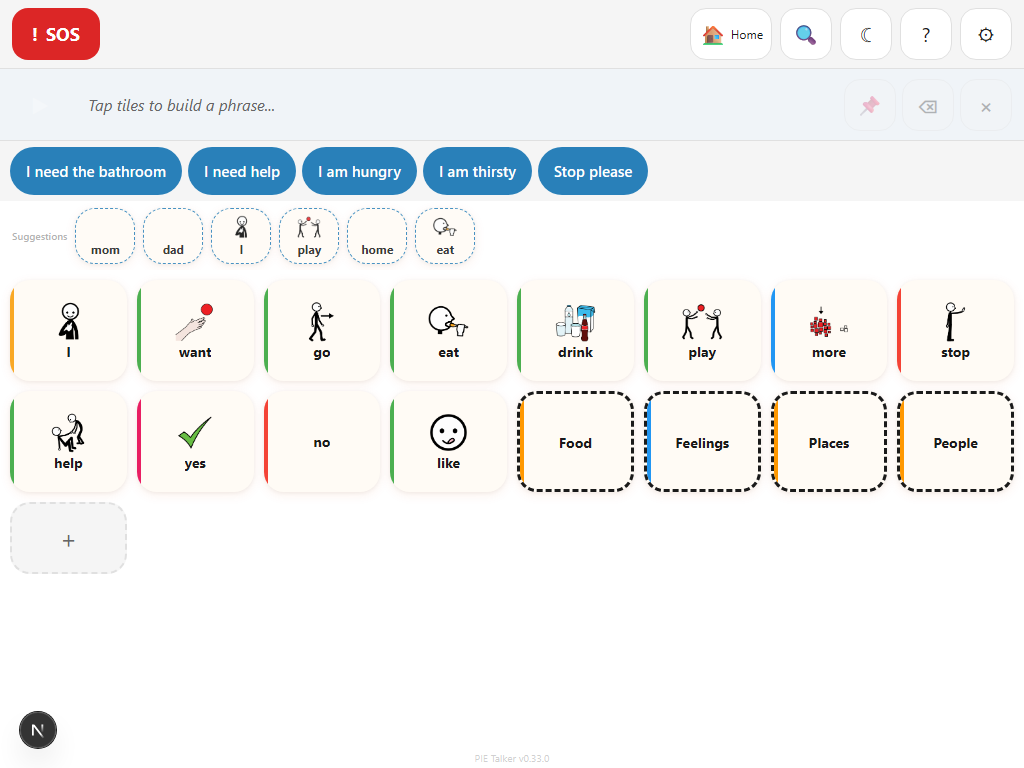
The full vocabulary is available with no restrictions. Grid density is at its maximum, fitting the most tiles on screen. All grammar tools, all vocabulary packs, and all advanced features are enabled. Predictions are fully sophisticated, using frequency, recency, time-of-day, situation context, and personal usage patterns. This stage suits experienced AAC users who want complete control and maximum communication speed.
How Stages Affect the Grid
The stage setting controls three things simultaneously, so a single change ripples across the entire experience:
- Tile count and grid density. Stage 1 shows fewer, larger tiles (2–3 columns). Each subsequent stage adds more tiles and more columns, up to the maximum at Stage 5. This is not just about screen space—fewer tiles means fewer decisions, which reduces cognitive load for someone still learning to make choices.
- Prediction complexity. At Stage 1, predictions are simple or turned off entirely. At Stage 2, predictions suggest the second word in common two-word phrases. By Stages 4 and 5, predictions use the full context engine: what was said, what time it is, where the person is, and what they typically say in similar situations.
- Vocabulary depth. Not every word is appropriate at every stage. Stage-aware filtering ensures that a Stage 1 communicator sees core requesting vocabulary, not past-tense verb markers. As the stage increases, more of each vocabulary pack becomes visible. Safety words (help, stop, emergency) are always available regardless of stage.
This layered approach means a caregiver does not need to manually curate every tile. Setting the stage does the heavy lifting, and the caregiver can then make fine adjustments from there.
Stage 5 at full density
Compare the hero screenshot above (Stage 1, minimal grid) with Stage 5 here. The same app, the same vocabulary packs, but a completely different experience tuned to the communicator's ability level.
Changing Stages
The communication stage is set during the initial setup wizard and can be changed at any time afterward. Here is how:
- Open Settings (tap the gear icon or long-press any tile and select Settings)
- Go to the Profile tab
- Find Communication Stage
- Select the new stage (1 through 5)
- The grid updates immediately—no restart required
There is no lock on stage changes. A speech-language pathologist, teacher, or caregiver can move the stage up or down as needed. If caregiver lock is enabled, only someone with the PIN or long-press access can change settings, but the communicator's ability to tap tiles and speak is never interrupted.
Stages are not permanent milestones. A communicator might use Stage 3 most of the time but switch to Stage 2 on a difficult day when cognitive fatigue makes a simpler grid more effective. The right stage is whatever works right now.
Stage-Aware Predictions
Pie Talker's prediction engine does not just suggest words—it suggests words appropriate for the communicator's current stage. This prevents the prediction row from becoming overwhelming or irrelevant.
- Stage 1–2: Predictions favor core vocabulary. High-frequency words like "want," "more," "go," and "help" dominate. The prediction row shows fewer suggestions, keeping the interface clean.
- Stage 3: Descriptors and question words begin appearing in predictions. If the communicator taps "I want," the prediction engine might suggest "big," "red," or "more" alongside concrete nouns.
- Stage 4–5: The full prediction engine engages. Suggestions draw on frequency data, time-of-day patterns, situation context ("Where I Am" setting), and personal usage history. The Discover section (if Enhanced Suggestions is enabled) shows new vocabulary from the full ARASAAC library, filtered to the communicator's stage level.
The prediction engine also respects the "AI Off" toggle. If predictions feel distracting at any stage, the communicator or caregiver can turn them off entirely. The grid works perfectly without predictions—they are a convenience, never a requirement.
Growing with the Communicator
The stage system is designed around a fundamental AAC principle: presume competence and provide a path forward. Starting at a lower stage does not mean the communicator is limited—it means the interface is simplified to make early success easier and more frequent.
Every communicator progresses at their own pace. There is no fixed timeline. Here is what growth often looks like:
- Stage 1: The communicator learns that tapping a tile makes something happen. They request favorite snacks, toys, or activities. Every interaction is a success.
- Stage 2: When ready, the communicator starts combining words. "I want cookie" replaces a single "cookie" tap. The phrase strip becomes part of the workflow.
- Stage 3: Descriptions and questions emerge. The communicator navigates folders independently and uses the search function to find specific words.
- Stages 4 and 5: These stages arrive when they arrive. Some communicators move through stages quickly; others are comfortable at one stage for a long time. The right pace is the communicator's pace.
The vocabulary is always there, waiting. The stage simply controls how much is visible at any given time. When the communicator is ready for more, adjusting one setting opens the door.
Explore More
Start at any stage. Grow from there.
Open Pie Talker and set the communication stage that fits. Change it anytime.
Open Pie Talker — Free