Smart Predictions & Discover
Pie Talker predicts your next word using time of day, situation context, and usage patterns. Discover new vocabulary from 13,000+ ARASAAC symbols — all on-device, all private.
How Predictions Work
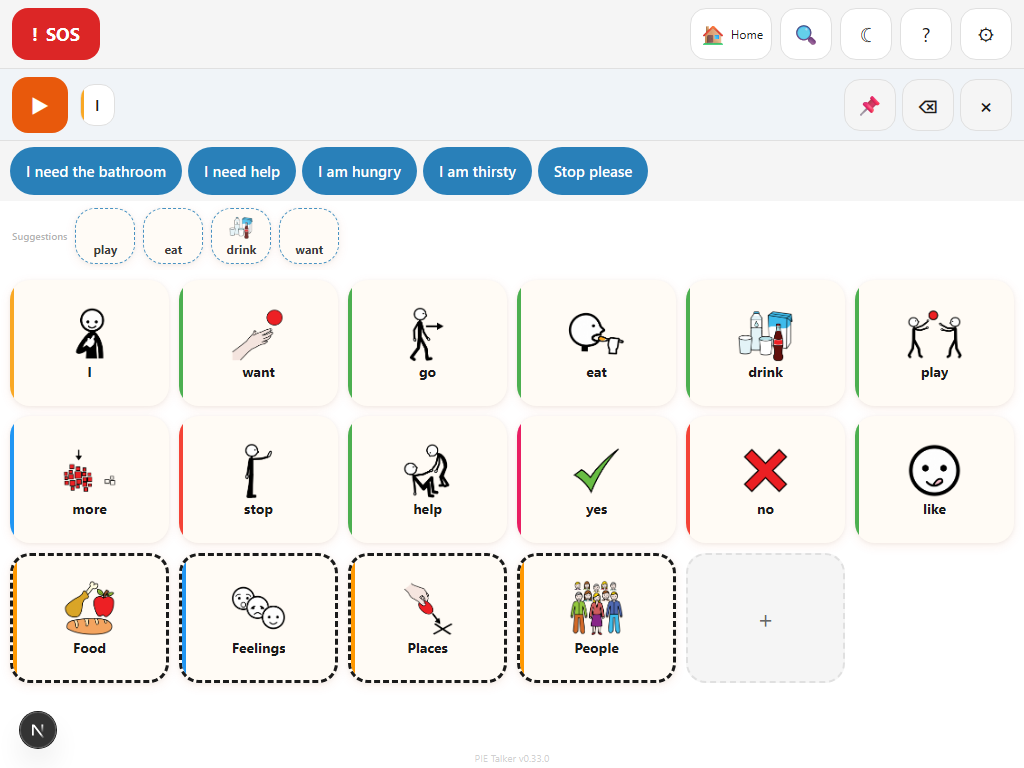
Pie Talker's prediction engine runs entirely on-device. Nothing is sent to a server. It combines multiple signals to suggest words the communicator is likely to want next, then presents them in a row above the grid for one-tap access.
The engine learns from how the communicator actually uses the app. Words used more often rise in predictions. Words used at certain times of day appear at those times. Words used in specific situations appear when that situation is active. Over time, the predictions become increasingly tailored to the individual.
Frequency
Words used most often get the highest prediction scores. The more you use a word, the more likely it is to appear in suggestions. This is the strongest signal and ensures the most important words are always within easy reach.
Time of Day
The engine tracks when words are used and adjusts predictions accordingly. "Breakfast" and "cereal" appear in the morning. "Tired" and "bed" appear in the evening. Time-of-day awareness happens automatically — no configuration needed.
Situation Context
When you set a situation using the "Where I Am" feature (e.g., Home, School, Mealtime, Doctor), predictions shift to match. At school, words like "teacher," "homework," and "friend" get boosted. At mealtime, food vocabulary rises. 16 situations are available.
Recency
Words used recently get a temporary boost. If you said "water" a minute ago, related words like "more," "cold," and "please" become more likely. This helps with natural conversational flow where topics cluster together.
The Prediction Row
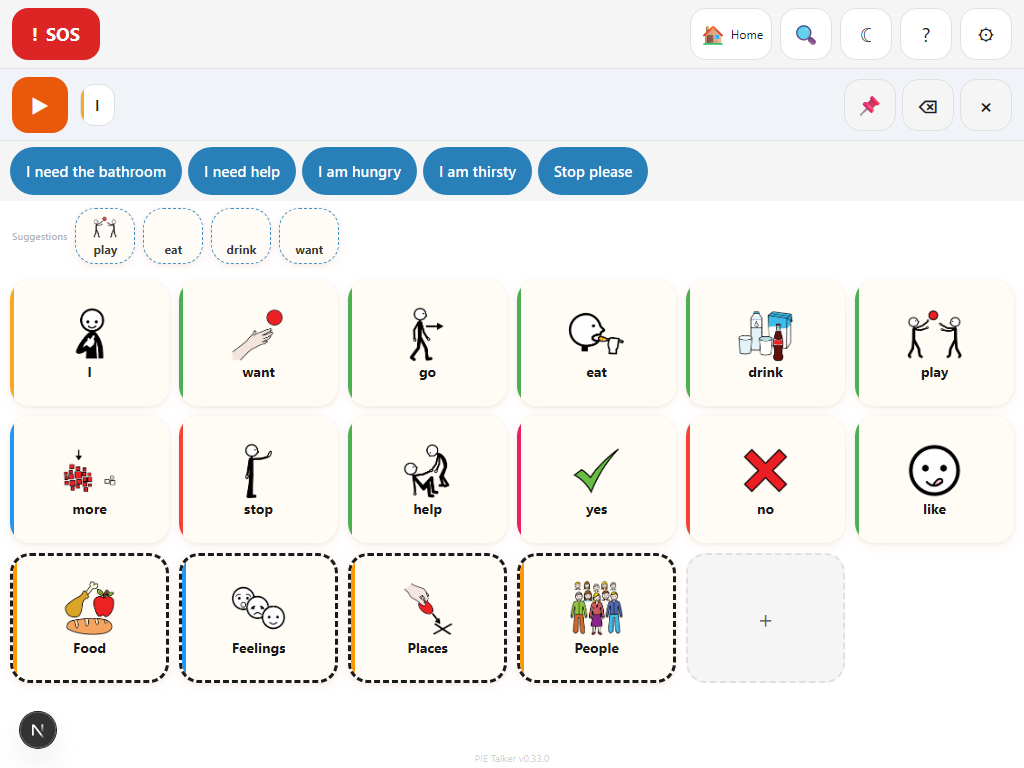
The prediction row appears above the main grid, below the phrase strip and quick phrases. It shows a horizontal row of suggested words, each displayed as a small tile with the word's label and symbol.
Tapping a prediction does the same thing as tapping a tile on the grid: the word is spoken aloud and added to the phrase strip. The difference is speed — instead of navigating to a folder to find the word, it is right there waiting for you.
How many predictions appear
The number of predictions shown depends on the communication stage. Beginning communicators see fewer suggestions (to avoid overwhelm), while advanced users see more. On wider screens, more predictions fit in the row. The row scrolls horizontally if there are more suggestions than fit on screen.
Predictions update in real time
After every tile tap, the prediction row refreshes to show new suggestions based on the updated context. If you tap "I" and then "want," the predictions shift to likely objects: "water," "food," "play," "help." This creates a conversational flow where predictions guide the communicator through a natural sentence structure.
Discover: grow your vocabulary naturally
The Discover section suggests new words from the full ARASAAC catalog of 13,000+ symbols — words that are not yet on the communicator's grid but might be useful based on their profile, context, and communication patterns.
- Suggestions are filtered by communication stage — beginners see simpler words
- Content filtering respects caregiver settings — inappropriate words are never shown
- Tap a Discover tile to auto-add it to the grid as a permanent tile
- Grammar-aware — suggestions prefer real vocabulary, not function words
Discover is controlled by the "Enhanced Suggestions" toggle in Settings → Vocabulary. It is on by default but can be turned off entirely if you prefer a fixed vocabulary.
How Discover selects suggestions
Discover does not show random words from the ARASAAC catalog. It uses a multi-signal scoring system to surface the most relevant vocabulary:
- Context matching: Words are scored against the active situation context using pre-computed semantic embeddings. At the "doctor" context, medical vocabulary rises to the top.
- Stage filtering: Words are categorized into tiers by complexity. Stage 1-2 communicators only see tier 1-2 words. Advanced communicators see the full range.
- Content gating: Words tagged with content categories (e.g., medical explicit, sexual health) are hidden unless the caregiver has explicitly enabled that category.
- Pack relevance: Words relevant to the selected vocabulary packs get a boost. If the School Life pack is active, school-related words score higher in Discover.
- Personal signals: Family member names, interests, and dietary context feed into scoring. If the communicator's interests include "dinosaurs," dinosaur-related vocabulary surfaces more often.
The AI Off Toggle
Some communicators, caregivers, or therapists prefer a fixed vocabulary without any automated suggestions. Pie Talker respects this completely. The AI Off toggle in Settings → Profile disables all prediction and Discover features.
When AI is off:
- The prediction row does not appear
- The Discover section does not appear
- No usage data is collected or analyzed
- The communication grid functions as a traditional AAC board with fixed tiles
The toggle is designed to be prominent and easy to find. It is labeled clearly, and turning it off takes effect immediately — no confirmation dialogs, no "are you sure" prompts. The app works perfectly well without predictions. For many use cases — especially therapy sessions where the therapist controls vocabulary presentation — a fixed board is exactly what's needed.
Settings → Profile → AI Off. The toggle is clearly labeled and near the top of the profile settings page. You can also find prediction-related settings in Settings → Vocabulary under the "Enhanced Suggestions" section.
"AI Suggests, Never Selects"
Predictions in Pie Talker are always optional. The communicator always chooses what to say. The prediction engine can suggest words, but it can never put words in someone's mouth or auto-select on their behalf.
This is a non-negotiable design principle that guides every decision about the prediction system. Communication autonomy is sacred. A suggestion is an offer. The communicator is always free to ignore it, scroll past it, or tap something completely different.
In practice, this means:
- Predictions never auto-insert into the phrase strip — the communicator must tap to accept
- There is no "auto-complete" that finishes a sentence without explicit action
- "None of these" is always a valid response to predictions — just ignore the row and tap the grid
- The prediction row never covers or blocks access to the main grid
- No prediction-related animation or notification draws attention away from the grid
Personal Signals
Beyond frequency and time-of-day, the prediction engine uses personal information from the communicator's profile to boost relevant vocabulary. This is the information collected during setup (and editable in Settings → Profile at any time).
Family members
If "Mom," "Dad," and "Jake" are listed as family members, those names get a prediction boost. The roles assigned to family members also influence predictions — if someone is tagged as "Teacher," school-related vocabulary gets a small boost when that person's name appears recently in conversation.
Interests
Interests like "dinosaurs," "swimming," or "music" create soft boosts for related vocabulary. If "dinosaurs" is listed as an interest, words like "dinosaur," "fossil," "T-Rex," and "extinct" appear more often in both predictions and Discover suggestions.
Dietary context
Dietary information (e.g., "vegetarian," "gluten-free," "allergic to peanuts") influences food-related predictions. At mealtime, the prediction engine avoids suggesting foods that conflict with dietary constraints and boosts appropriate alternatives.
All personal data stays on-device. Family names, interests, and dietary information are stored in the browser's local storage and never transmitted anywhere. The prediction engine runs entirely in the browser. Pie Talker has no server, no accounts, and no analytics that touch personal data.
Explore more
Two minutes to your first word
No accounts. No downloads. Open the link and start communicating.
Start Talking — Free