Where I Am & Context
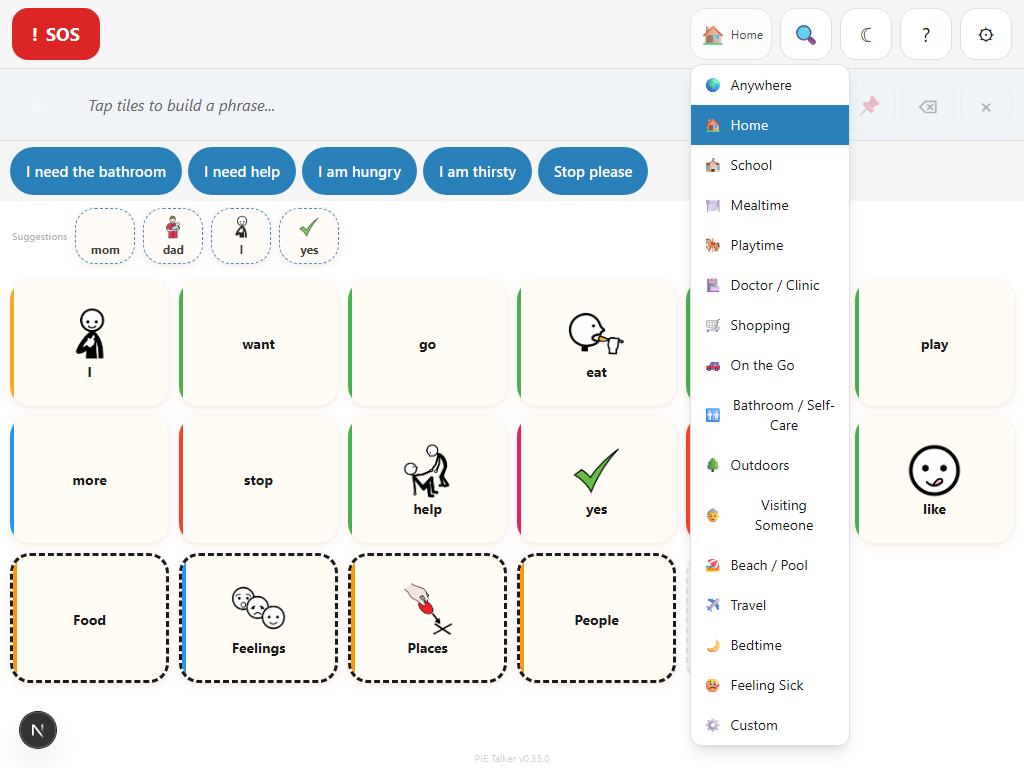
Set the current situation and predictions shift to match. 16 contexts from Home to Hospital. Manual control with no GPS tracking—the communicator or caregiver decides where they are.
What Is "Where I Am"?
"Where I Am" is a manual context selector that tells the prediction engine about the communicator's current situation. When the context is set to "School/Classroom," school-related words rank higher in predictions. When it is set to "Mealtime/Kitchen," food and drink vocabulary surfaces first.
This is not automatic location detection. Pie Talker does not use GPS, does not track the device's location, and does not share any position data. The communicator or their caregiver deliberately selects the current context, and it stays set until someone changes it.
The feature is entirely optional. If no context is selected, predictions still work—they just rely on frequency, recency, and time-of-day patterns instead of situation awareness. Setting a context adds an extra layer of relevance, making predictions more useful without being required.
The 16 Contexts
Pie Talker provides 16 pre-defined contexts that cover the most common situations in daily life. Each context shifts prediction scoring so that situationally relevant words appear first.
These 16 contexts were chosen to cover the situations AAC communicators encounter most frequently, based on research and consultation with speech-language pathologists. They span childhood through adulthood, from playgrounds to workplaces, from routine daily activities to medical emergencies.
How Context Affects Predictions
Pie Talker's prediction engine uses multiple signals to rank word suggestions. Context is one of the most powerful:
- Context scoring. Every word in the vocabulary has a pre-computed relevance score for each of the 16 contexts. When a context is active, words with high relevance for that situation get a scoring boost. "Fork" and "plate" score high in Mealtime/Kitchen; "pencil" and "homework" score high in School/Classroom.
- Time-of-day blending. Context and time-of-day work together. At 8:00 AM in the School/Classroom context, morning-related school words (circle time, calendar, good morning) rank even higher. At 12:00 PM in the same context, lunch-related words naturally surface.
- Personal usage patterns. If the communicator frequently says "juice" during Mealtime/Kitchen, that word will rank higher than other drink words in that context over time. The prediction engine learns from usage within each context.
- Pack interaction. Words from active vocabulary packs that are relevant to the current context get a combined boost. If the Medical & Care pack is active and the context is Doctor/Clinic, medical vocabulary receives both a pack boost and a context boost, making it very likely to appear in predictions.
The context scoring uses a blended approach combining two different word-relevance models (cluster-based and gradient-based) to handle both simple words and multi-word labels accurately. For example, "kitchen sink" correctly scores high for Mealtime/Kitchen even though "sink" alone might be ambiguous.
Manual Control, No Tracking
Pie Talker takes a deliberate stance on context awareness: the user controls it, not the device.
No GPS. No geofencing. No location services. No data leaves the device. The "Where I Am" feature is entirely manual. The communicator or caregiver taps a context, and it stays set until someone changes it. That is the entire mechanism.
This design is intentional for several reasons:
- Privacy. AAC communicators—especially children and people with disabilities—deserve strong privacy protections. Location tracking has no place in a communication tool.
- Reliability. GPS signals fail indoors, in hospitals, in schools. A manual selection always works, regardless of signal quality or device capabilities.
- Simplicity. Automatic location detection adds complexity, permission dialogs, battery drain, and potential for errors. A manual tap is instant and unambiguous.
- Control. The caregiver or communicator knows their situation better than any algorithm. Setting "Therapy Session" when working with a speech therapist gives more accurate predictions than any GPS coordinate could.
The context stays set across app sessions. If the communicator goes to school every morning, the caregiver can set "School/Classroom" once and it persists until changed. There is no need to re-select it every time the app opens.
Custom Context Label
The 16 built-in contexts cover most situations, but life does not always fit neatly into categories. The "Custom" context option lets you type your own context name for situations not in the list.
Examples of custom contexts:
- Grandma's House—different vocabulary needs than being at home
- Swimming Pool—specific to a recurring activity
- Music Class—more specific than "School/Classroom"
- Respite Care—a specific caregiving situation
- Birthday Party—a social event with unique vocabulary needs
Custom contexts use the prediction engine's general relevance scoring rather than pre-computed context-specific scores. The prediction engine still benefits from frequency, recency, and time-of-day data, so predictions remain useful even without a specific context model.
To set a custom context, select "Custom" from the context list, then type the label in the text field that appears. The custom label displays in the above-grid bar so the communicator and anyone nearby can see the current context at a glance.
Where to Find It
The "Where I Am" context can be set in two places, designed for convenience depending on the situation:
Above-Grid Bar
The current context is displayed in the bar above the communication grid. Tapping it opens the context selector directly from the communication screen. This is the fastest way to change context—no need to open settings at all. The above-grid bar is visible during communication, so switching from "School/Classroom" to "Playground/Park" at recess takes one tap.
Settings → Profile
The context can also be set from the Profile tab in Settings. This is useful for initial setup or when making multiple configuration changes at once. The same 16 contexts plus the Custom option are available in both locations.
If caregiver lock is enabled, the above-grid context selector may be accessible or locked depending on the lock setting. With the PIN lock, changing context from the above-grid bar does not require the PIN—it is considered a communication-adjacent action, not a settings change. The rationale: context changes during the day (moving from classroom to lunchroom) should not require unlocking settings every time.
Explore More
The right words for right now
Set the situation. Predictions shift to match. No tracking, no GPS, no data shared.
Open Pie Talker — Free